Data Transfer using FM acoustic waves
Motivation
About a year ago, the PC I owed from highschool crashed: it would turn on but neither the WiFi, bluetooth, Ethernet or USB ports worked. As this was near the end of the semester the situation was very dire so I used ended up buying another PC when my search for possible fixes ended. Fast forward a year latter, I realized that even without wires or fancy radio frequency tranceivers, point to point communication is still possible. Best example is how humans communicate by making sounds in the audible frequency range. Having had Audacity, a fairly advanced sound recording software on the old PC, a text editor, and a working c/c++ compiler, I was lucky. I could use my new PC to create and play a sound file containing some information and record it over on my old PC . I would then save the sound file in some format, and apply some signal processing concepts to recover the encoded information.
Theory
In order to transfer useful information between the two computers in a server-to-client modal, we need a way systematically encode the the information we want to send from the server in the form that can be recovered by the client. The idea here is to encode the information in sound waves which we would play over a speaker at the server, and recorded at the client for decoding.
To encode this information, I used \frequency modulation (FM) as amplitude modulation (AM), is too suspectible to literal noise from the environment despite it having the advantage of higher data rates.
To perform frequency modulation we need a carrier wave and the signal. Let \(x(t)\) represent the information signal, and \(y(t)\) the modulated signal when we use a sinusoidal carrier wave of form $ cos(\theta_i)$. Frequency modulating implies the rate of change of angle \(\theta\) of the carrier wave is proportional to the frequency of the modulated signals. For simplicity in decoding/demodulating, we choose two frequencies corresponding to a 1 or a 0 in a bit of information, \(f_1\) and \(f_0\), respectively. The overall function of the modulated signal worked out to be
Using examplar data and a sinusoidal carrier, we obtain a modulated signal of the form shown below:
| {:height=”500px” width=”450px” .image-caption } |
Fig1: Frequency modulation of a bit string
To decode the signal on the receiving computer, we need a way of identifying the frequency components of the modulated signal at every possible block corresponding to a bit. We also recognize that the sinusoid is a discrete signal during both modulation and demodulation. By making every bit containing block correspond to a fixed number of samples \(N\) , we need only calculate an \(N\)-point Discrete Fourier Transform (DFT).
Although we could use the already optimised FFT algorithm to perform the DFT at \(n \;log(n)\) time, we only need the DFT at two frequencies thus using the FFT is inefficient. We resolve to use a simplified form of the FFT, the Geortzel algorithm which calculates the \(N\) point DFT in \(log(N)\) time using a recursive formula i.e. \(\begin{equation} X(k)=\sum_{n=0}^{N-1}x(n)W_N^{kn}=y_k \end{equation}\) \(\text {where}\) \(\begin{equation} y_k=y(n-1)W_N^{-k} + x(n) \quad \forall \ n\in N \ | y(-1)=0 \quad \text {and} \quad W_N^{k}=e^{-jk2\pi /N} \end{equation}\)
Design
- Sound file format (.WAV)
I chose to work with a windows operating system native .WAV file format because it offers high quality lossless recording of audio and is easier to work with than other formats like .mp3 and .m4a file. The lossless attribute was important as losing even a single bits of information could lead to further data corruption.
- Programming language (.c)
Choice influenced by the availability of gcc/g++ compiler in the client machine. This meant that I would have to mainly rely on the c/c++ standard library packages and write everything else from scratch.
- Recording software (Audacity)
This is a free & open source software which happened to be in the client machine. It records sound in various file formats as opposed to the native recorder that records in only .m4a format. Furthermore, it is helpful in cutting out sessions of the recording corresponding to padding bits. I padded the senders’s modulated signal with a third frequency for a fixed amount of time before the real transmission began to sort out the true beginning of the intended message.
- Test file (a plain text file)
It is easier to debug with as it modulates into a small .WAV file and it demodulates in bytes to the characters contained in the original .txt file.
- Hardware (2 PCs)
The original broken PC with zero network connection and a second working PC to play out a recording of a modulated message.
Code
We obtain the header information of the recorded by reading from the WAV files FILE pointer into a C-struct data type. The main sections of the structure are commented
//Wav file header information
typedef struct WAVHeader{
    char riff_header[4];
    int wav_size;           //total file size
    char wave_header[4];
    char fmt_header[4];
    int fmt_chunk_size;
    short audio_format;
    short num_channels;
    int sample_rate;    //the number of samples per second
    int byte_rate;
    short sample_alighment;
    short bit_depth; //number of bytes per sample
    char data_header[4];
    int data_bytes; //number of bytes in data

}WAVHeader;
The bit depth, typically 2 bytes, tells us the number of bytes per sample of data. The sample rate is set to be matched the server and client computer and it tells us the number of samples taken per second. The number of data bytes helps us calculate the total number of samples present in the file.
We encode the information using nested loops in c such that for every bit in a byte of information, we generate a modulated signal amplitude corresponding to the output modulating function (1) for all samples present in the file. This is shown below in the snippet below:
    //iterate all bytes in message
    while (l<wh.data_bytes){ //the number of required bytes of information

        if (l>=wb){     //skip reading for the padding section
        fread(nptr,1,1,fd);
        }

        //iterate all bits in bytes of message
        for (m=7; m>=0; m--){
        int j=0; //samples in block

     //iterate all samples in a period/frame
     while(j<nf){
            t=i/sf;                     //calculate t in seconds
            if (l<wb){                  //padding frequency bytes FM signal
            *sptr=INT16_MAX*cos(2.0*PI*fpad*t); //modulated signal amplitude, y(t)=cos((Wc+Kf*x(t))*t)
            fwrite(sptr,1,2,ft);        //write info to transmitting file
            }
            else                         //intended bytes FM signal
            {

            *sptr=INT16_MAX*cos((2.0*PI*fsig+2.0*PI*kf*(0b00000001 & (*nptr >> m)))*t); //modulated signal amplitude, y(t)=cos((Wc+Kf*x(t))*t)
            fwrite(sptr,1,2,ft);        //write info to transmitting file

            }
            i++;
            j++;
        }

        }
        l++;
    }
After properly writing encoding the signal to a .WAV file, we obtain a modulated signal which may look something like this 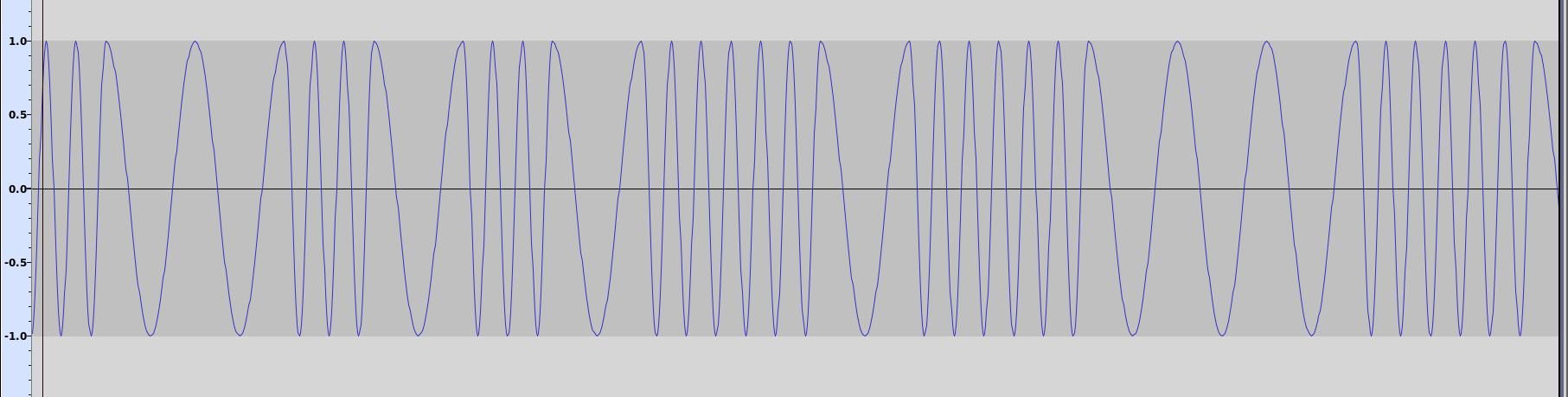 for a randomized number of bits.
The sound signal when played over speaker may sound something like this
to the nearby recording client computer.
To demodulated the recorded signal at the receiving client, we calculate a N-point DFT using the geortzel algorithm as shown on the function below for each sample in a period of the modulated signal
//calculate N point DFT using the recursive geortzel algorithm
double complex goertzel(int16_t * sa,int lsa,int k){   //pass sample array address and the frequency index probed
    double complex X;    //DFT
    int n; double complex yk;

    X=0;    //y(-1)=0
    //y(n)=y(n-1)*W_N^k -x(n)
    for (n=0;n<lsa; n++){
        double complex ss=((double) sa[n])/INT16_MAX;
        X=X*cexp(-I*((2*PI)/lsa)*k)+ ss;
    }


    return X; //N point DFT at frequency w=(2*pi*k/N)


}
To access the N points within a period of the modulated signal we use nested loops which iterate and recover a bit of information for every N samples of the recorded file using the algorithm above and saving it to a new file.
    //iterate all periods/frames within the samples of the WAV file with binary encoded information
    while (i<ns/nf){
      *bptr=0;
      //find all bits for a byte of information
      for(m=7; m>=0;m--){
      j=0;
      int16_t ps[nf]; //array to store the N samples in a period for a DFT
      //iterate all N samples in a period
      while(j<nf){
        //read all the sample values and add them to sample array
        fread(sptr,1,2,fr);
        ps[j]=*sptr;
        j++;
      }
     //perform DFT to obtain the bits corresponding to N samples using the geortzel algorithmn
     double X1=cabs(goertzel(ps,nf,K1));  //zeros frequency DFT magnitude
     double X2=cabs(goertzel(ps,nf,K2));  //ones frequency -//-

    //compare magnitudes to determine its a zero or a one
     if (X2/X1>1.0){
       *bptr=(bmask1<<m) | *bptr;  //assign 1 for the value for the mth bit of the byte
       //printf("X1=%lf X2=%lf\n",X1,X2);
     }
     else
     {
       *bptr=(bmask0<<m) | *bptr; //aasign 0 value for the mth bi
     }

     }
     fwrite(bptr,1,1,fo); //write the decoded byte information to the output file
     i++;
    }
This concludes the code section, the rest of the code can be found on the repository
Results
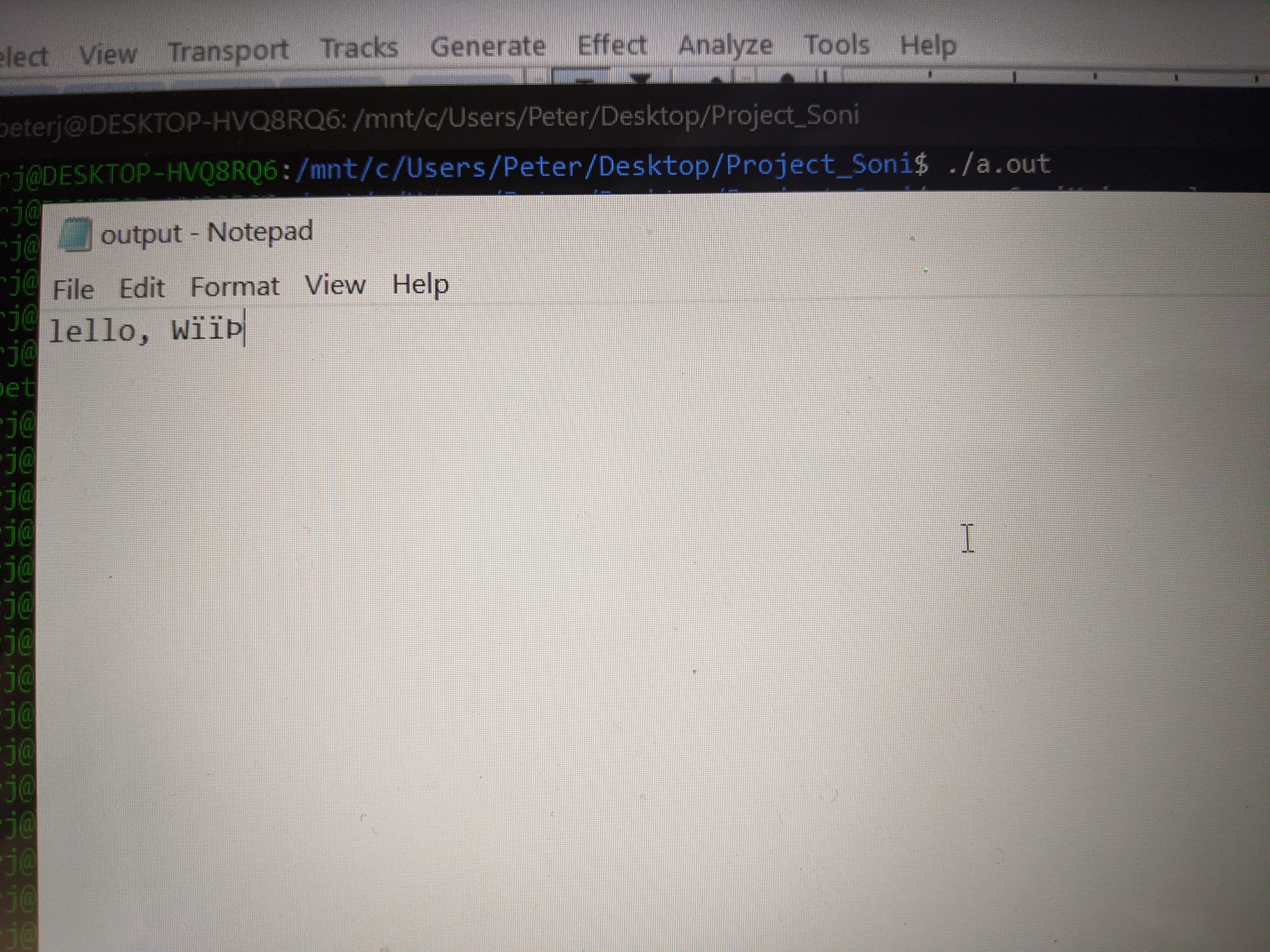
We create a plain text file “testdoc.txt” with the contents Hello, World and save it to the root directory of our program. We compile the soniMain.c file with “gcc soniMain.c –lm” option so as to include the math and complex c libraries. We run the executable and a new file transmit.WAV will be created. We play this audio file while simultaneously recording sound on the receiving computer. After we finish recording on the client computer, we export the recorded file as a .WAV file to the root directory folder of the project. We make necessary edits to the main file variables and compile. An output.txt file will be created, and opening it should give us the encoded message. As shown below:
Conclusion
It works! 😌, getting a single test to work took a while. On the image you can observe Hello, world text with slight modifications. There seems to a lot of bit variations during the sending and thus much of the message is not recoverable. This problem can be alleviated by using a better microphone and by avoiding a noisy or echoy environment.